Skip to content
Corporate events

Your event on the big screen. In your brand.

For awards nights, conferences, launches and company parties. Attendees scan a QR code and share their photos, you check each one, and the best appear on your screens with your logo alongside.

No card needed · Every feature included · Pay for the storage you use
On your screens

A photo wall that gets everyone talking.

How it works

Ready for your next event.

  1. Add your brandingYour logo and colours on the gallery, the QR signs, the live screen and the emails.
  2. Print the QR codeOn table cards, lanyards, slides and signs around the venue.
  3. Put the wall on screenOpen the live screen on any TV or projector and connect it with a short code.
  4. Share the gallery afterAttendees view and download everything from one private link.

Branded QR code signs for events.

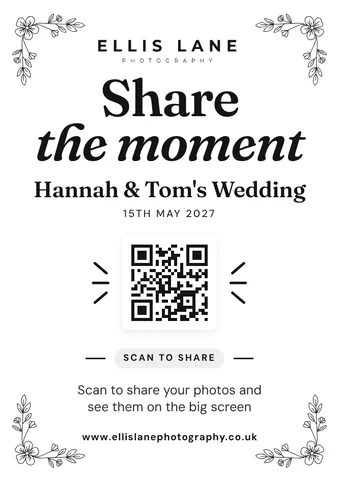
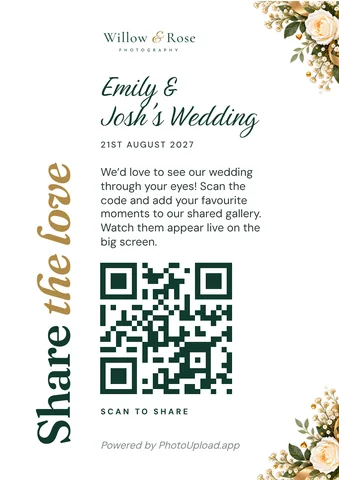
  • Branded wedding QR code sign for a wedding photographer: printable A5 QR poster with the photographer’s logo
    Wedding · A5 poster
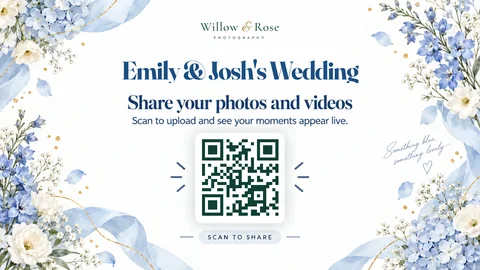
  • Branded wedding live screen QR poster for a wedding photographer, with the photographer’s logo and blue flowers
    Wedding · Live screen
  • Branded wedding QR code table card for a wedding photographer: printable A6 card with the photographer’s logo and website
    Wedding · A6 table card
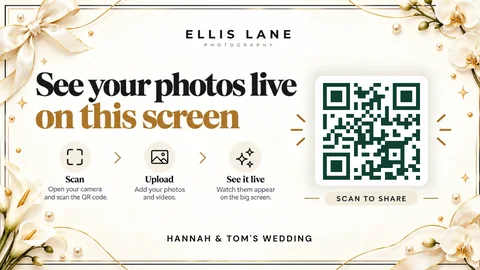
  • Branded wedding live screen QR poster for a wedding photographer, with the photographer’s logo in ivory and gold
    Wedding · Live screen
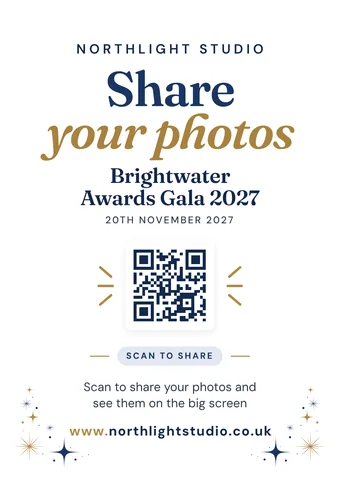
  • Branded corporate event QR code sign: printable A5 QR poster for an awards gala, with the event photographer’s name and website
    Awards gala · A5 poster
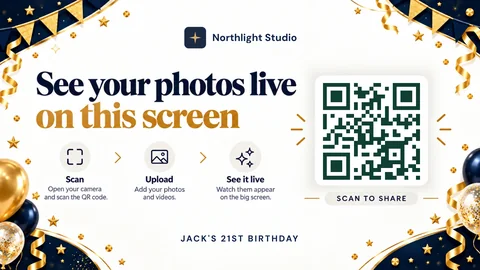
  • Branded 21st birthday live screen QR poster for an event photographer, with the photographer’s logo in navy and gold
    21st birthday · Live screen
What you get

Built for professional events.

Approve before showing

Check every photo before it reaches the screen, or give the job to a colleague with a link.

Your branding

Your logo and colours on the gallery, QR signs, live screen and emails. Save the look as a template for next time.

Two ways to show them

A moving Story Wall of photos and captions, or one photo at a time.

No app for attendees

They scan with their phone camera and they’re in. No accounts.

Insights

See how many people joined in and what they shared.

Your own web address

Galleries on your own domain, as an add-on.

Questions

Good to know

Can we check photos before they go on screen?

Yes. Turn on Approve before showing and each photo waits for you, or a colleague with the approval link, before it appears.

Can it carry our company branding?

Yes. Your logo and colours go on the gallery, the QR signs, the live screen and the emails. With your own web address, the PhotoUpload credit on the signs goes too.

What do we need at the venue?

A TV, projector or laptop with a web browser and an internet connection. Open the live screen, then type the code it shows on your phone.

Can attendees download the photos afterwards?

Yes. Share the gallery link and they can view and download everything, for as long as you keep it open.

Can my team help run it?

Yes. Give colleagues their own logins, and see who did what in the activity log.

Put your next event on the big screen.

Try it free for 7 daysPrices